FLOW workshop · 12–20 minutes
A subject with a still center.
Make a recognizable subject feel surrounded by movement. Learn to protect what matters, sculpt the space around it and keep an editable version.
Choose example images or your own. The same guide stays within reach in the studio.
Bring the right source.
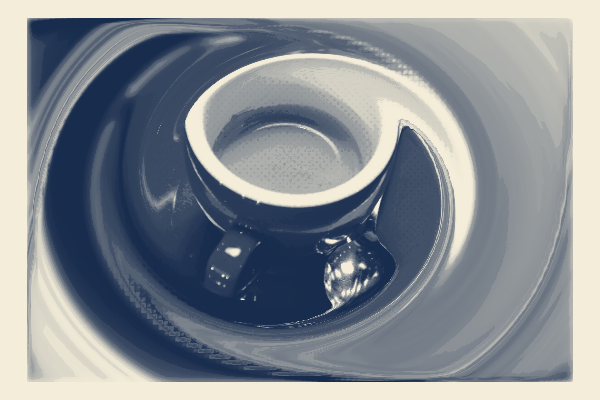
Use a person, animal or object with space around it. The coffee photograph gives a clear rim and handle to protect; choose a source you have permission to use.
Inspect the sources and credits →Leave with useful files.
A composed PNG and an editable project backup with the source, focal treatment and local edits.
You can create and follow the workshop for free. Watermarks, dimensions, animation length and production packages depend on the export option; check the format guide and Free / Pro before planning a delivery.
The work, step by step.
01 / FLOW
Choose the visual anchor
Try Coffee current or load your own image. Decide which features must survive: the cup rim and handle, a whole face, or a complete product label. Hold Original to compare.
- Check your work
- The subject is recognizable before adding movement.
- If it goes wrong
- Choose a wider source if the subject fills the frame and leaves no useful surround.
02 / FLOW
Compose the current
Open Start and choose Photographic current. Show source photo and place the protected detail. Adjust its radius to cover all defining features, then choose Movement and Turn.
- Check your work
- The subject stays readable while the surrounding photograph has a clear direction.
- If it goes wrong
- Move or enlarge protection if important edges distort. Reduce Movement if the surround folds into distracting shapes.
03 / FLOW
Compare, apply and refine
Compare the preview with the source and preview the short loop. Apply starting point when the still works. For a local adjustment, open Brush: Pin holds the current shape; Sculpt, Twist and Repair change the surrounding mesh.
- Check your work
- The improvement survives at thumbnail size. Undo can restore the state before Start.
- If it goes wrong
- Undo an unhelpful gesture. Protect the complete defining region before releasing excess pins elsewhere.
04 / FLOW
Give color a supporting role
Open Compose. Adjust Tone first; add or reduce Grain only after the shape works. Toggle a pass to compare its contribution.
- Check your work
- The subject remains readable with the finishing stack turned off.
- If it goes wrong
- Reduce contrast if highlights lose all detail. Keep only passes that serve the image.
05 / FLOW
Keep the direction
Preserve a version in History before an alternative. In Start, Save style keeps the reusable focal treatment and ink family; it does not contain your photo or later brush gestures. Keep a project for the full work.
- Check your work
- You can compare a different movement direction and return to the chosen composition.
- If it goes wrong
- Use the saved History version if the alternative loses the subject.
06 / FLOW
Deliver and preserve the structure
Export PNG for the visible result, then save a project backup. Reopen the backup in a fresh studio tab to check the photo, pins and shape survived.
- Check your work
- The PNG opens as an image; the project opens as editable work. Free PNG includes a watermark; Pro production options are described at export.
- If it goes wrong
- A PNG is flattened. Keep the project file if you want to change the pins later.
Make a second interpretation.
Save the Start style, then try it on a second photo. Refit the focal area and inspect every defining feature; keep the inks and movement direction to build a series.