FLOW workshop · 15–25 minutes
A cover that moves.
Develop a strong still into a short motion study, with a deliberate start, a readable focal point and a recoverable source project.
Choose example images or your own. The same guide stays within reach in the studio.
Bring the right source.
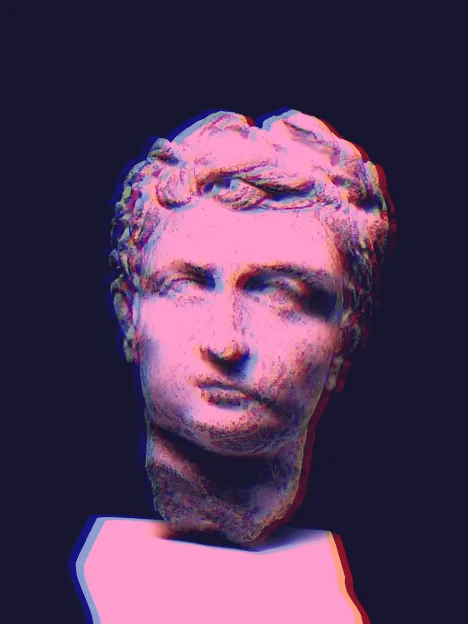
Choose a sculpture, portrait or object with one dominant form. The Marble memory source is a photograph of a Roman sculpture. Leave space around its edges; add cover typography in your layout tool.
Inspect the sources and credits →Leave with useful files.
A cover PNG, a short GIF or replay video, and the editable project.
You can create and follow the workshop for free. Watermarks, dimensions, animation length and production packages depend on the export option; check the format guide and Free / Pro before planning a delivery.
The work, step by step.
01 / FLOW
Establish a strong still
Load the sculpture example or your own photograph. Open Start → Photographic current; fit the protected detail around the entire face or defining object, then choose the sweep direction.
- Check your work
- The focal form remains readable at a small cover size.
- If it goes wrong
- Move protection or lower Movement before adding finishing passes.
02 / FLOW
Judge the loop before applying
Use Preview short loop in Start. Inspect the quiet anchor and the moving surround throughout the loop, then Apply starting point. Keep a History version of the still.
- Check your work
- Both ends preserve the defining features; movement supports the composition.
- If it goes wrong
- Enlarge the protected area if facial features split; reduce Movement if the loop becomes distracting.
03 / FLOW
Choose loop or recorded evolution
Use the current treatment for a composed loop. For a gesture replay, make a few deliberate Sculpt or Twist actions after applying. Replay selects an earlier moment as Now; preserve a later state first if needed.
- Check your work
- You can explain whether the output is a repeating current or a record of your edits.
- If it goes wrong
- Action replay does not invent gestures. Choose the composed loop when a repeated motion is the intended cover.
04 / FLOW
Keep motion readable
Open Compose and compare a restrained Tone or Duotone treatment with the existing stack. Complex stacks make animation export slower; keep the passes that improve the cover.
- Check your work
- The focal point remains visible at both ends of the motion.
- If it goes wrong
- Reduce Color offset or contrast if moving edges become too noisy.
05 / FLOW
Save still and alternate
Use History to keep the chosen still and an alternate. Compare their composition before choosing the state to export.
- Check your work
- You can return to the cover still after inspecting another moment.
- If it goes wrong
- A chosen Replay moment becomes Now; use your preserved version to restore a later state.
06 / FLOW
Read the actual motion file
Export the cover PNG and a short GIF or video. Choose MP4 when H.264 encoding is available; WebM is the browser alternative. Open the file and inspect its start, end and focal clarity. Save the project too.
- Check your work
- The file plays with visible movement and a readable subject. Export shows the current Free / Pro duration and size limits.
- If it goes wrong
- Choose a calmer movement if the loop seam distracts. A heavy finish can slow encoding or reduce video dimensions.
Make a second interpretation.
Try the same motion with a landscape and use a quieter color treatment. Compare the still at thumbnail size.