DUEL workshop · 20–30 minutes
From collision to printed poster.
Use DUEL to invent a photographic relationship, then send the visible result to TRACE and develop it into an editable ink separation.
Choose example images or your own. The same guide stays within reach in the studio.
Bring the right source.
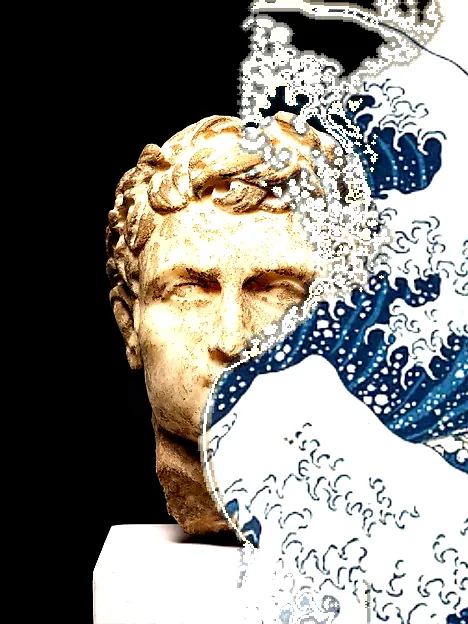
Choose two images with broad forms. The supplied Impossible marble pair uses a sculpture photograph and an artwork reproduction; inspect the source credits. Compose their relationship before reducing it to inks.
Inspect the sources and credits →Leave with useful files.
A collage PNG, TRACE print PNG and editable SVG, plus one project retaining both stages and original source images.
You can create and follow the workshop for free. Watermarks, dimensions, animation length and production packages depend on the export option; check the format guide and Free / Pro before planning a delivery.
The work, step by step.
01 / DUEL
Build a readable relationship
Load the supplied pair or your own images. Open Start → Crosscut, compare both crops and fit a shared diagonal. Apply when each source has a useful role; use Edit for local ownership where needed.
- Check your work
- The collage has a focal subject and broad areas that can survive reduction.
- If it goes wrong
- Correct the crops or choose a more coherent pair before asking TRACE to simplify it.
02 / DUEL
Preserve the editable pair
Export the collage PNG. Send to will retain an editable DUEL stage with both sources; a project backup gives you an independent recovery copy.
- Check your work
- You have a file that can restore the two original source images and their relationship.
- If it goes wrong
- Do not rely on the flattened image alone if you may need to reframe either source.
03 / DUEL
Send the visible result to TRACE
In Export, choose Send to TRACE. This makes the visible collage the input of a new TRACE version. It does not transfer two separate DUEL source layers into TRACE.
- Check your work
- TRACE opens with the collage as its image. History shows a two-stage Process with an Edit DUEL control.
- If it goes wrong
- Use History → Edit DUEL to repair the composition. Then choose Rebuild finish to repeat the retained TRACE settings on that revision.
04 / TRACE
Make a focal ink print
In TRACE open Start → Tonal print. Position the focal area over the part of the collage that must survive; quiet the background and apply. In Plates, compare two, three and five inks and adjust the boundaries.
- Check your work
- The printed interpretation preserves the relationship without depending on every photographic detail.
- If it goes wrong
- Return to History → Edit DUEL if the composition itself is unclear; Rebuild finish repeats the retained TRACE decisions.
05 / TRACE
Keep a clean and expressive version
Use History to preserve the clean separation. Try a small registration offset or a new ink pair and compare the versions.
- Check your work
- The alternative changes the character without losing the main subject.
- If it goes wrong
- Keep Compose restrained if the editable SVG is the primary deliverable; raster passes are not baked into SVG paths.
06 / TRACE
Deliver both stages
Export the TRACE PNG and SVG, then download one project backup. In History, edit DUEL, change its framing and Rebuild finish to verify the retained TRACE inks and offsets follow your new composition.
- Check your work
- The project reopens with both stages and original source images. The SVG is editable; inspect it in the intended design application before production.
- If it goes wrong
- A PNG alone cannot retain the process. Keep the project, including its upstream versions; rebuilding adds a new branch and leaves the earlier result available.
Make a second interpretation.
Send a restrained FLOW sculpture into TRACE using the same route. History retains the upstream stage, so you can revise its source and rebuild the later finish.