DUEL workshop · 15–25 minutes
A directed two-image collage.
Give each image a clear role, connect their focal forms and refine where they meet. Compare a composed cut with a tonal overlay.
Choose example images or your own. The same guide stays within reach in the studio.
Bring the right source.
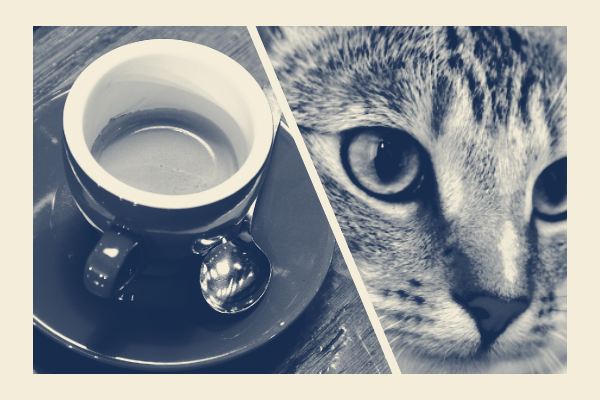
The supplied cup and cat photographs connect a round rim with a gaze. For your own pair, look for a related shape, direction or contrast. Two busy scenes need more deliberate cropping.
Inspect the sources and credits →Leave with useful files.
A composed collage PNG, an optional short motion file and a project preserving both sources and their framing.
You can create and follow the workshop for free. Watermarks, dimensions, animation length and production packages depend on the export option; check the format guide and Free / Pro before planning a delivery.
The work, step by step.
01 / DUEL
Give the pair different jobs
Try Cup meets gaze or load A and B. Name the visual connection: a repeated curve, a gaze, a horizon or a meaningful contrast. A determines the output shape.
- Check your work
- Both images contribute to one idea.
- If it goes wrong
- Choose another B if there is no useful relationship to frame.
02 / DUEL
Start from a strong arrangement
Open Start → Crosscut. Compare Photo A and B with the preview. Adjust each horizontal and vertical crop, zoom and mirror to bring the cup and gaze to the shared diagonal and focal height.
- Check your work
- Both subjects read at a small size without clipped defining features.
- If it goes wrong
- Reduce zoom or shift the relevant crop; automatic fitting is a proposal, not subject recognition.
03 / DUEL
Choose the kind of meeting
Compare Crosscut with Paired study for separate regions. For a subject-and-texture overlay, choose Tonal weave, set its light / dark target and Texture visibility, then compare Blending on and off. Apply the arrangement that serves the pair.
- Check your work
- You can tell which source leads and what the second adds.
- If it goes wrong
- Lower texture visibility if the overlay obscures the subject. Return to Crosscut if two distinct subjects need their own space.
04 / DUEL
Refine the contact and local ownership
Open Edit. Adjust each source independently, then choose Original edge, Clean cut or Feather. Photo A / B brushes keep a source in a local area; Erase returns it to the automatic rule. Balance, Brightness, Edge and Chaos remain alternatives for territory experiments.
- Check your work
- The contact is intentional and neither source disappears without a reason.
- If it goes wrong
- Reduce Feather width if a face ghosts. Balance changes competition, not opacity; use the blending controls for an overlay.
05 / DUEL
Compare before polishing
Preserve a version in History. Try one alternate framing or territory, compare the result, then use Compose only if it helps unify the pair.
- Check your work
- The relationship works before extra color treatment.
- If it goes wrong
- Restore the stronger version if color effects only hide a weak composition.
06 / DUEL
Deliver the collision
Export PNG and save a project backup. For motion, choose a short loop or replay video and open the actual file to check that both photos remain readable.
- Check your work
- The backup restores both sources, independent framing and painted influence. The motion file actually plays.
- If it goes wrong
- A flattened PNG cannot restore the two sources separately. Retain the project for future changes.
Make a second interpretation.
Save the Start style and keep B fixed while trying another A. Batch refitting adjusts the pair for each A; review the new relationship before keeping it.